python可视化matplotlib


python可视化matplotlib

大家好我是羔羊,今天给大家分享一下python进行数据分析的一些基本操作。

基础绘制

1639275630(1)

#设置字体为SimHei显示中文

plt.rcParams[‘font.sans-serif’] = ‘SimHei’

#设置正常显示字符

plt.rcParams[‘axes.unicode_minus’] = False

线条(ls)的类型: ( ‘:’ ‘–’ ‘-‘ ‘-.’ )

线条(marker)上点的类型 1-4 、o、d、+、H、h、|、.、,、*

# legend 显示出来 标签是需要展示才能显示出来 loc 就是图例 用于展示的意思,但是会出现乱码问题

# 位置设置’upper right’, ‘upper left’, ‘lower left’, ‘lower right’, ‘right’, ‘center left’, ‘center right’, ‘lower center’, ‘upper center’, ‘center’,‘best’
plt.legend(loc=’best’)

具体代码:

1
2
3
4
5
6
7
8
9
10
11
12
13
14
import numpy as np
import matplotlib.pyplot as plt


plt.rcParams['font.sans-serif'] = 'SimHei'
plt.rcParams['axes.unicode_minus'] = False
x = np.linspace(0,100,1000)
y = np.sin(x)
plt.plot(x , y, ls=':', marker='.', markersize=15, c='red', markeredgecolor='blue', \
markerfacecolor='black', label='x和y的关系')
plt.legend(loc='upper left')
plt.show()

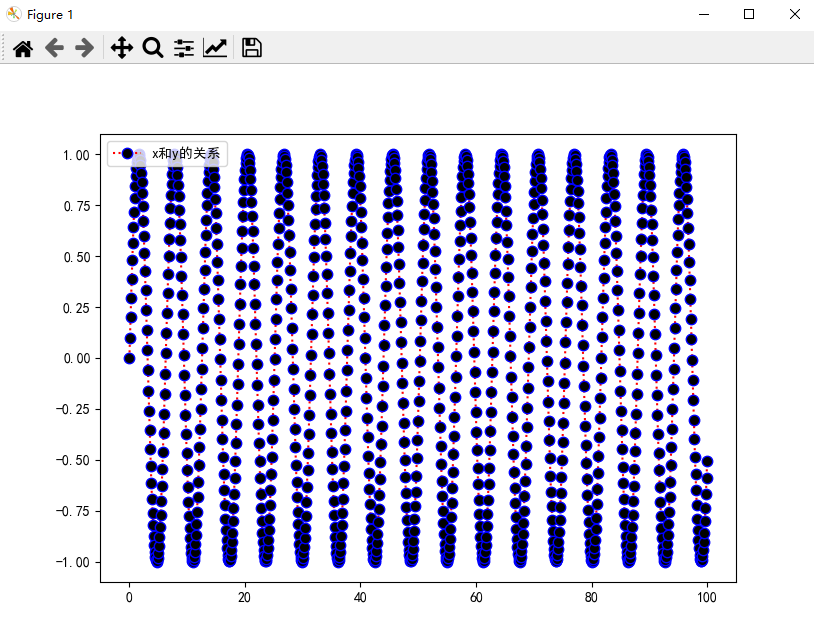
显示效果:

image-20211214115931616

饼图

素材内容:

指数名称 市场 标的名称 持有市值
沪深300 A股 510310 30000
沪深300 A股 110020 20000
中证红利 A股 515180 20000
中证消费 A股 159928 20000
恒生指数 港股 513660 24000
标普500 海外 513500 24000
黄金ETF 其他 518880 1000
主动债券 债券 110027 22000
1
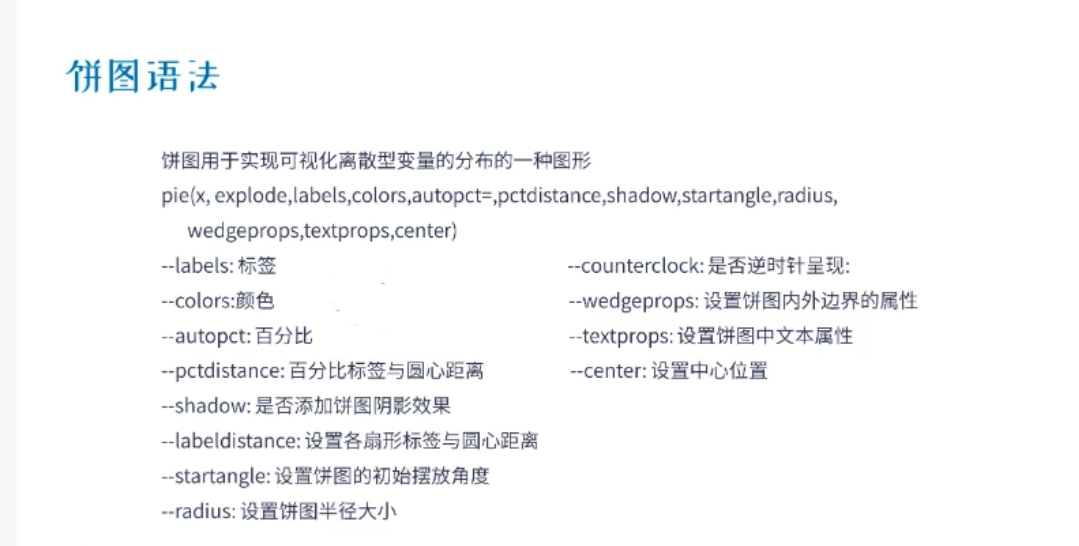
plt.pie(x,explode,labels,colors,autopct,pctdistance,shadow,startangle,radius)

image-20211214094532316

以下是具体代码:

1
2
3
4
5
6
7
8
9
10
11
12
13
14
15
16
17
18
19
20
21
22
23
24
25
26
27
28
29
30
31
32
33
34
35
36
37
# x         设置饼图数据

# explode 设置饼图中数据的突出性,会让设置的那部分从圆里面往外凸出来,以列表的形式记录下来

# labels 设置每一块饼图的标题

# colors 设置每一块饼图的颜色

# autopct 设置每一块饼图的数据以百分比的样子显示出来,其中小数点后面的为保留的小数位例如:%.1f%% 为保留一位小数

# pctdistance 设置每一块饼图的百分比标签与圆心的距离,0位圆心,1.1为圆外面

# labeldistance 设置每一块饼图的标题到圆心的距离,1.1表示在圆的外面

# startangle 设置起始绘制角度,默认图是从x轴正方向顺时针画起,如果设定startangle=90,则从y轴正方向画起

# radius 设置饼图半径的大小一般为 1.2-1.5

# counterclock 是否为逆时针方向画起

# wedgeprops 其中 linewidth 设置饼图边缘的边框色大小 edgecolor 边框颜色 以字典的形式编写

# textprops 其中 fontsize 设置饼图中数字的大小(百分比标签数字和标题数字) color 设置字体颜色

plt.pie(x = x_data, explode = explode, labels = y_data, colors = colors,

autopct = '%1.1f%%', pctdistance = 0.8, labeldistance = 1.1, startangle = 90,

radius = 1.2, counterclock = False,

wedgeprops = {'linewidth':2, 'edgecolor':'pink'},

textprops = {'fontsize':10, 'color':'black'})

# title 设置总标题 pad 距离分布图的距离
plt.title('股市数据分析', pad = 30)
plt.show()

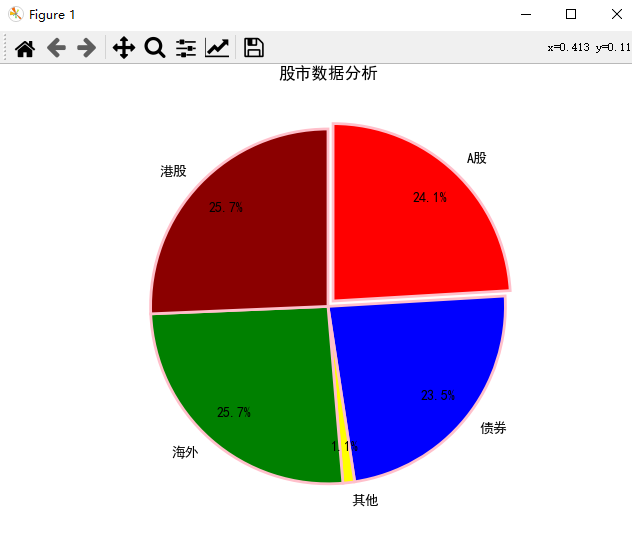
具体效果:

image-20211214121018786


文章作者: Gao Yang
版权声明: 本博客所有文章除特別声明外,均采用 CC BY 4.0 许可协议。转载请注明来源 Gao Yang !
评论
  目录